Description
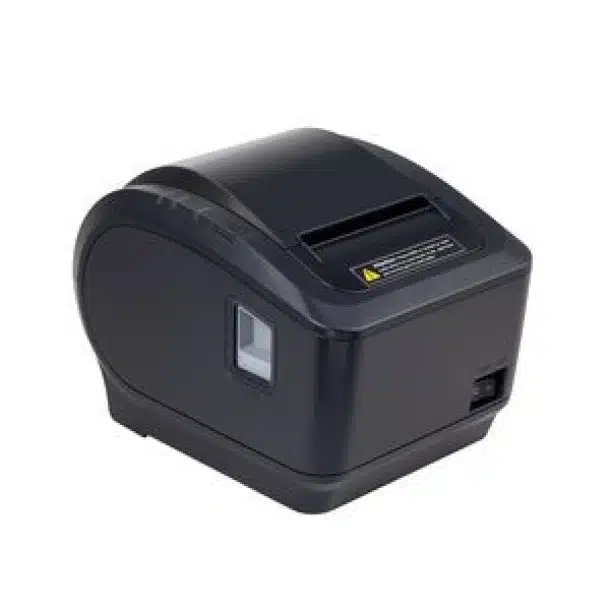
XP-M817B USB Thermal Receipt Printer
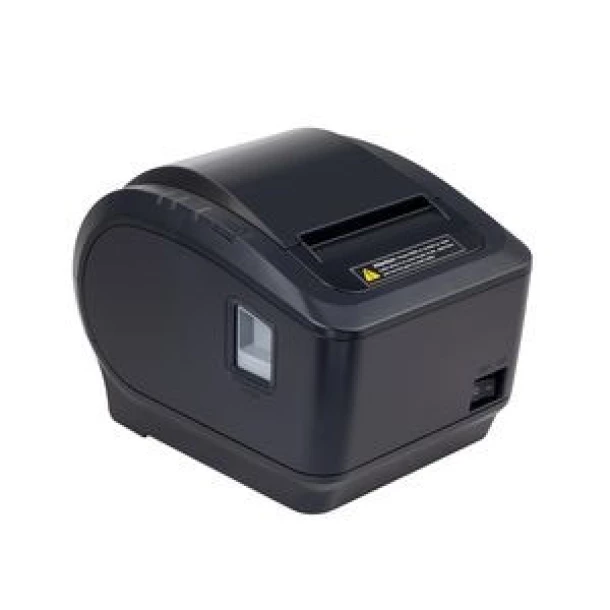
Overview
Key Features
Printing Technology
- Thermal Line Printing:
- Utilizes direct thermal printing technology, which means it prints using heat on thermal-sensitive paper. This eliminates the need for ink or toner, making it cost-effective and low-maintenance.
Print Speed
- High-Speed Printing:
- Capable of printing at speeds up to 250 mm/sec, which ensures quick transaction processing and minimizes customer wait times.
Print Resolution
- 203 dpi (8 dots/mm):
- Produces clear, high-quality text and graphics, suitable for detailed receipts that may include logos, graphics, or barcodes.
Paper Specifications
- Paper Width:
- Supports 80 mm (3.15 inches) wide thermal paper rolls, which are standard in many retail environments.
- Maximum Paper Roll Diameter:
- Accommodates rolls up to 80 mm in diameter, reducing the frequency of paper changes and minimizing downtime.
Connectivity Options
- Multiple Interfaces:
- Typically equipped with USB and LAN (Ethernet) interfaces, providing flexible connectivity options:
- USB: For direct plug-and-play connection to computers and POS systems.
- LAN: For network connectivity, allowing multiple devices to access the printer over a network.
Cutter
- Automatic Cutter:
- Features an automatic cutter that cuts the paper after each print, ensuring a professional appearance and reducing manual handling.
- Cutter Durability:
- Designed for long life, supporting up to 1 million cuts, making it suitable for high-volume environments.
Compatibility
- Operating Systems:
- Compatible with various operating systems, including Windows, Linux, and MacOS, ensuring seamless integration with most POS systems.
Driver and Software Support
- Comprehensive Driver Support:
- Provides drivers and utilities for easy setup and configuration, enabling quick integration with existing POS solutions.
Benefits
- Fast and Efficient:
- High-speed printing capabilities ensure rapid transaction processing, improving customer service and efficiency.
- Flexible Connectivity:
- The combination of USB and LAN interfaces allows for versatile deployment in different environments, supporting both standalone and networked configurations.
- Cost-Effective:
- Thermal printing technology reduces consumable costs by eliminating the need for ink or toner.
- User-Friendly Design:
- Easy installation and operation make it accessible for staff with minimal technical knowledge.
- Durable and Reliable:
- Built to withstand the demands of high-volume environments, providing long-term reliability and performance.
Typical Use Cases
- Retail Stores:
- Ideal for printing sales receipts and transaction records.
- Restaurants and Cafes:
- Suitable for printing order tickets, customer bills, and kitchen orders.
- Hotels and Hospitality:
- Useful for printing guest bills, invoices, and transaction receipts.
- Kiosks:
- Can be used for printing tickets and receipts in self-service kiosks.
- Healthcare Facilities:
- Can print patient billing statements and transaction receipts.
Setup and Operation
- Connecting the Printer:
- Use the USB cable for direct connection to a POS system or computer, or connect via LAN for network access.
- Installing Drivers:
- Install the necessary drivers from the provided CD or download them from the manufacturer’s website to ensure proper communication between the printer and the POS system.
- Loading Paper:
- Open the printer cover, insert the thermal paper roll with the leading edge facing down, and close the cover to secure the paper.
- Configuring Settings:
- Use the provided utility software to adjust printer settings such as print density, paper cut options, and network configurations.
- Regular Maintenance:
- Periodically clean the print head and cutter to maintain optimal performance and extend the printer’s lifespan.
Accessories
- Thermal Paper Rolls:
- Use high-quality 80 mm thermal paper rolls for optimal printing results.
- USB and Ethernet Cables:
- Included for connectivity options; ensure compatibility with your POS system.
- Power Adapter:
- Included for powering the printer.

 10%
10% 9%
9% 31%
31%